

Four decades after Microsoft first unveiled Windows 1.0, the operating system that would come to define personal computing continues to shape how billions of people interact with technology daily. From its humble beginnings as a graphical layer atop MS-DOS to today’s AI-powered Windows 11 with Copilot integration, the History of Windows OS has undergone one of the most remarkable transformations in computing history. This comprehensive examination explores how Windows evolved from a simple windowing system into the dominant desktop platform that currently powers over 70% of the world’s computers, revolutionising everything from business productivity to gaming, and setting the stage for the next era of AI-driven computing. As Windows 10 approaches its end-of-support date on October 14, 2025, understanding this evolution becomes even more critical for users planning their transition to Windows 11 and beyond.
The pre-Windows computing landscape: when commands ruled the desktop
To truly appreciate Windows’ revolutionary impact, one must understand the computing world that existed before graphical user interfaces became mainstream. In the early 1980s, personal computing was dominated by command-line interfaces that required users to memorise complex text commands to perform even basic tasks. The learning curve was steep, and the margin for error was unforgiving. Users spent hours mastering arcane syntax just to accomplish what would later become simple point-and-click operations.
The MS-DOS era: a text-based foundation
Microsoft’s MS-DOS (Microsoft Disk Operating System) emerged as the de-facto standard for IBM PC-compatible computers throughout the early 1980s. Users navigated their systems by typing commands such as “DIR” to list files, “CD” to change directories, and “COPY” to duplicate files. This command-line interface, whilst powerful for experienced users, presented significant barriers to mainstream adoption. The blinking cursor on a black screen intimidated newcomers, creating a perception that computers were tools exclusively for technical professionals.
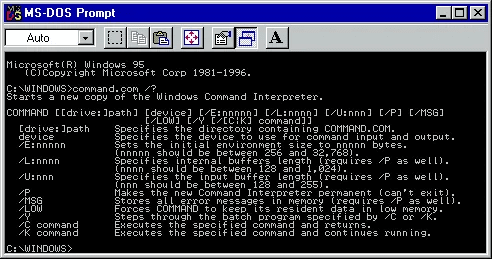
The MS-DOS environment required users to understand file structures, remember command syntax, and troubleshoot issues through cryptic error messages. Simple tasks like copying a file from one location to another involved typing precise commands with correct syntax. A single typo could result in data loss or system errors. This technical complexity meant that personal computers remained largely confined to businesses, educational institutions, and dedicated enthusiasts who were willing to invest considerable time learning these systems. The average consumer saw little reason to invest in a machine that required such extensive training to operate effectively.
Beyond the immediate usability challenges, MS-DOS systems lacked visual feedback mechanisms that modern users take for granted. There were no progress indicators during file operations, no preview capabilities for documents or images, and no intuitive way to organise files beyond remembering their exact locations in the directory structure. Users developed elaborate naming conventions and kept paper notes documenting their file organisation schemes.
The GUI revolution begins: inspiration from Xerox and Apple
The concept of graphical user interfaces wasn’t entirely new when Windows arrived. Xerox’s Palo Alto Research Center (PARC) had pioneered the desktop metaphor in the 1970s with the Alto computer, introducing concepts like windows, icons, menus, and mouse-driven interactions. These innovations included revolutionary ideas such as overlapping windows, drop-down menus, and the concept of files represented as visual icons rather than text listings. However, these innovations remained largely confined to research environments due to the prohibitive cost of the hardware required. A single Xerox Alto system cost tens of thousands of dollars, placing it well beyond the reach of individual consumers or most businesses.
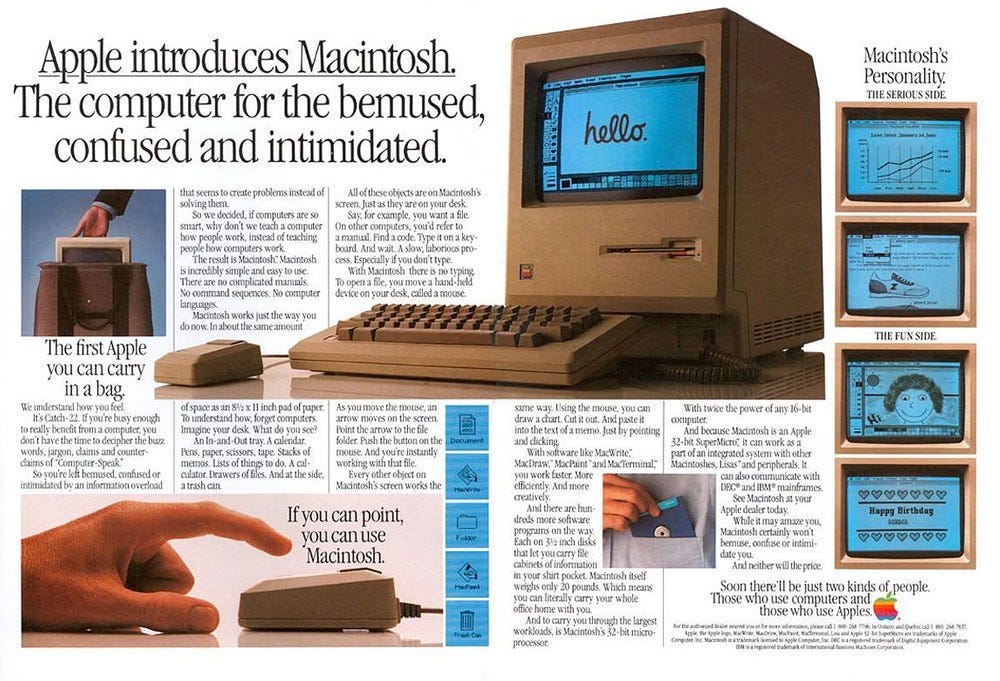
Apple democratised GUI computing with the Lisa in 1983 and the Macintosh in 1984. The Macintosh’s “Hello” campaign and user-friendly interface demonstrated that computers could be intuitive tools rather than intimidating machines requiring extensive technical knowledge. Apple’s approach proved that graphical interfaces could make computing accessible to non-technical users, setting the stage for Microsoft’s own GUI ambitions. The Macintosh introduced concepts like the trash can icon for deleted files, the ability to drag and drop documents, and WYSIWYG (What You See Is What You Get) document editing. These metaphors translated complex computer operations into familiar real-world actions, dramatically reducing the learning curve for new users.
The birth of Windows: Microsoft’s GUI revolution

Windows 1.0 (1985): the first step towards visual computing
On November 20, 1985, Microsoft launched Windows 1.0, marking the company’s first serious attempt at creating a graphical user interface for IBM PC-compatible computers. Initially codenamed “Interface Manager,” Windows 1.0 represented a significant departure from the text-based MS-DOS environment that dominated personal computing. The system required 256 kilobytes of RAM and two floppy disk drives, specifications that seemed modest but were actually quite demanding for many computers of the era.

Windows 1.0 introduced several revolutionary concepts to PC users. The system featured tiled windows that couldn’t overlap, basic multitasking capabilities, and mouse support. These features seem elementary today but were groundbreaking for their time. The operating environment included essential applications such as Notepad, Calculator, and Paint, providing users with immediate productivity tools within the graphical interface. Additional bundled applications included a clock, calendar, card file for contact management, and even a simple terminal program for connecting to bulletin board systems. These applications demonstrated the practical utility of the graphical interface beyond mere novelty.
Despite its innovations, Windows 1.0 faced significant challenges. Critics dismissed it as too mouse-dependent, a curious complaint given that the mouse was still a relatively new input device for most PC users. Many computer users had never touched a mouse before and found the new input method awkward and unnecessary. The system’s performance was sluggish on contemporary hardware, with screen redraws visibly slow and application launching taking several seconds. Its tiled window approach felt restrictive compared to the overlapping windows found on competing systems like the Macintosh. Sales were modest, with only about 500,000 copies sold in the first two years, but Windows 1.0 established the foundation upon which Microsoft would build its graphical interface empire.

Windows 2.0 (1987): overlapping windows and enhanced functionality
Microsoft addressed many of Windows 1.0’s limitations with the release of Windows 2.0 in December 1987. The most significant improvement was the introduction of overlapping windows, allowing users to layer multiple applications on screen. This feature would become fundamental to modern GUI design. The ability to overlap windows created a more natural workspace metaphor, mimicking how people organise physical documents on a desk. Users could now see portions of multiple applications simultaneously, making it easier to reference information across different programs.
Windows 2.0 also introduced maximize and minimize controls, giving users greater control over their workspace organisation. The system featured improved memory management and better integration with MS-DOS, making it more stable and practical for daily use. Performance improvements were noticeable, with faster screen updates and more responsive application behaviour. Perhaps most importantly, Windows 2.0 became the platform for the first versions of Microsoft Word and Excel, establishing the foundation for Microsoft’s office productivity dominance. This strategic decision to develop major applications for Windows created a compelling reason for users to adopt the platform. The combination of improved interface design and killer applications like Word and Excel gave Windows 2.0 significantly better market reception than its predecessor, selling over 2 million copies.

The breakthrough years: Windows 3.x and the path to mainstream success
Windows 3.0 (1990): the first commercial success
Windows 3.0, released in May 1990, marked Microsoft’s first major commercial breakthrough in graphical computing. This version finally delivered the performance and functionality that made Windows a viable alternative to character-based interfaces for mainstream users. The system represented a dramatic leap forward in both technical capabilities and visual polish, featuring a redesigned interface with more refined icons, better colour support, and a more professional appearance overall.
The system introduced true multitasking capabilities, allowing users to run multiple applications simultaneously without the severe performance penalties that plagued earlier versions. This preemptive multitasking meant that one misbehaving application was less likely to freeze the entire system, a significant improvement in stability. Windows 3.0 also featured enhanced graphics support, including VGA compatibility that enabled richer visual experiences with support for 256 colours at 640×480 resolution. The Program Manager provided a more intuitive way to organise and launch applications, moving beyond the simple file listings of MS-DOS. Users could now create logical groups of applications and arrange them in a hierarchical structure that made sense for their workflow.

Perhaps most crucially, Windows 3.0 achieved widespread software support from third-party developers. Major software companies began developing Windows-native applications, creating the ecosystem necessary for the platform’s long-term success. Adobe, Aldus (maker of PageMaker), and numerous other software publishers committed to the Windows platform, bringing professional-grade applications to the system. By 1992, Windows 3.0 had sold over 10 million copies, establishing Microsoft as a major player in the GUI market. The system’s success also drove hardware sales, as computer manufacturers positioned their systems as “Windows-ready” and users upgraded their machines to take advantage of the new capabilities.
Windows 3.1 (1992): refinement and multimedia integration

Windows 3.1, released in April 1992, refined the Windows experience with improved stability and new multimedia capabilities. The system introduced TrueType font support, enabling high-quality typography that improved both screen display and printing quality. This advancement was particularly significant for business users who required professional document presentation. TrueType fonts were scalable, meaning they could be displayed and printed at any size without the jagged edges that plagued bitmap fonts. This single feature transformed Windows into a legitimate desktop publishing platform, competing with systems that had previously cost tens of thousands of dollars.
The multimedia enhancements in Windows 3.1 included sound support and basic video playback capabilities, positioning Windows as a platform for emerging multimedia applications. The system shipped with Media Player, which could handle both audio and video files, albeit in limited formats. These capabilities arrived just as CD-ROM drives were becoming standard computer peripherals, opening up new possibilities for interactive encyclopaedias, educational software, and entertainment titles. The system also featured improved file management through File Manager and enhanced network support, making it more suitable for business environments. Windows for Workgroups 3.1, released later the same year, added peer-to-peer networking capabilities that allowed small offices to share files and printers without expensive server infrastructure.

Windows 3.1’s stability improvements addressed one of the most common complaints about earlier versions. The system was significantly more resistant to crashes, and when problems did occur, error messages became somewhat more informative. These refinements, combined with the growing library of available software, made Windows 3.1 the version that truly brought graphical computing to the mainstream business world. The system sold over 3 million copies in its first two months alone, demonstrating that Windows had finally achieved market acceptance.
Windows 95: the start of modern computing

The revolutionary interface design
Windows 95, launched on August 24, 1995, represented perhaps the most significant transformation in personal computing history. The system introduced the Start Menu and Taskbar, interface elements so successful they remain fundamental to Windows design three decades later. The Start Menu provided a hierarchical organisation of programs and system functions, whilst the Taskbar offered quick access to running applications and system notifications. These innovations solved one of the most frustrating aspects of Windows 3.1: keeping track of open applications and finding programs buried in Program Manager groups. The Start button itself became an iconic element, teaching an entire generation of users that clicking this single button would reveal everything the computer could do.
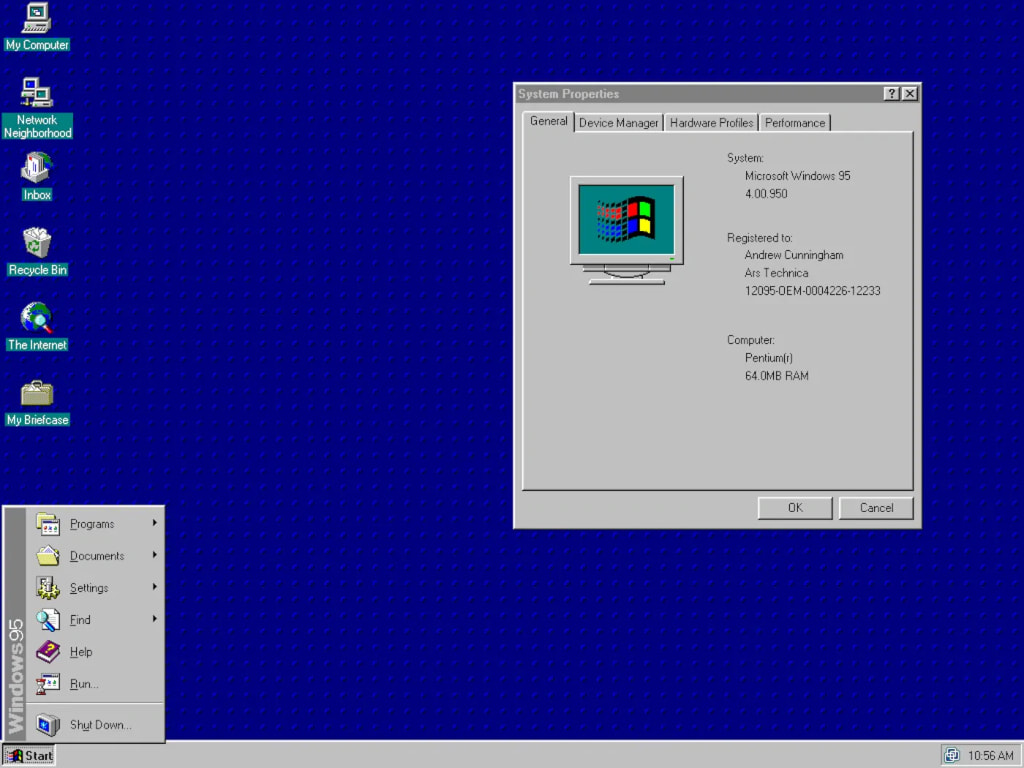
The desktop metaphor reached full maturity in Windows 95, with users able to place shortcuts, files, and folders directly on the desktop for quick access. The system’s object-oriented approach meant that users could right-click on virtually any element to access contextual menus, making the interface more discoverable and intuitive. This right-click functionality revealed actions appropriate to each object, eliminating the need to hunt through menu bars for relevant commands. The introduction of long file names, supporting up to 255 characters instead of the restrictive 8.3 format of MS-DOS, made it dramatically easier to organise and identify files. Users could finally name their documents “Q3 Sales Report for Northeast Region” instead of cryptic abbreviations like “Q3SLSNE.DOC.”
Windows 95 also introduced the concept of document-centric computing through file associations. Users could double-click a document file, and Windows would automatically open the appropriate application. This seemingly simple feature represented a fundamental shift in how people thought about using computers, focusing on the work they wanted to accomplish rather than the tools required to accomplish it.
Technical innovations and 32-bit architecture
Beyond its interface innovations, Windows 95 delivered substantial technical improvements that positioned it as a modern operating system. The transition to 32-bit architecture enabled better memory management and support for larger files, whilst preemptive multitasking provided more stable operation when running multiple applications. Unlike the cooperative multitasking in Windows 3.1, where applications had to voluntarily yield control to the system, Windows 95’s preemptive approach meant the operating system could forcibly interrupt misbehaving programs, dramatically improving overall system stability.
Plug and Play functionality revolutionised hardware installation, automatically detecting and configuring new devices without requiring users to manually set jumpers or edit configuration files. This feature alone eliminated one of the most frustrating aspects of PC ownership for non-technical users. Before Plug and Play, installing a new sound card or modem often required understanding IRQ conflicts, DMA channels, and memory addresses. With Windows 95, users could simply install hardware and expect it to work, bringing PCs closer to the simplicity of consumer electronics.
The system also introduced better support for long file names in a way that maintained compatibility with older DOS and Windows 3.1 applications. Windows 95 accomplished this through a clever dual-naming system, creating both long file names and compatible 8.3 short names automatically. This backward compatibility ensured that the vast library of existing software would continue to function even as the platform moved forward.
Cultural impact and market transformation
Microsoft’s marketing campaign for Windows 95 achieved unprecedented cultural penetration, featuring The Rolling Stones’ “Start Me Up” and a launch event hosted by Jay Leno. The campaign successfully positioned Windows 95 not just as software, but as a cultural phenomenon that would transform how people used computers. Microsoft spent over $300 million on the launch campaign, including buying the entire print run of The Times newspaper in the United Kingdom to distribute a promotional supplement. The company projected the Windows 95 logo onto landmarks worldwide and created a genuine sense of anticipation rarely seen for software products.
The launch’s success was reflected in sales figures: Windows 95 sold over 40 million copies in its first year, establishing Microsoft’s dominance in the desktop operating system market. The system’s success also drove hardware sales, as users upgraded their computers to take advantage of Windows 95’s enhanced capabilities. Computer manufacturers reported record sales, and the minimum system requirements of 4 MB of RAM (8 MB recommended) drove a boom in memory sales. The Windows 95 launch effectively created the modern PC upgrade cycle, where users would periodically refresh their hardware to run the latest software.
Windows 95 also established patterns that would influence computing for decades. The combination of the Start button, Taskbar, and desktop icons became the standard interface paradigm, copied by competing operating systems and remaining largely unchanged in Windows even today. The system proved that Microsoft could not only create compelling software but also shape public perception and excitement around technology in ways previously achieved only by Apple.
The internet era: Windows 98 and the connected computer

Windows 98, released in June 1998, positioned the PC as the gateway to the emerging Internet age. The system featured Internet Explorer 4 integration, making web browsing a seamless part of the desktop experience through Active Desktop functionality. Users could now place web content directly on their desktop, with live updates creating a dynamic workspace that blurred the lines between local and online content. USB support enabled a new generation of peripheral devices, whilst enhanced multimedia capabilities supported the growing digital media ecosystem. The system introduced FAT32 file system support, enabling hard drives larger than 2 GB to be formatted as single partitions, a significant improvement as drive capacities continued to expand.
The system’s focus on Internet connectivity proved prescient, as the late 1990s saw explosive growth in home Internet adoption. Windows 98’s web integration made it easier for average users to access online resources, contributing to the Internet’s transformation from a niche academic and business tool to a mainstream communication and entertainment medium. The inclusion of Outlook Express for email and NetMeeting for video conferencing positioned Windows 98 as a complete communications platform. The system also improved dial-up networking, streamlining the process of connecting to Internet service providers at a time when most home users still connected via telephone modems.

Windows 98 Second Edition, released in 1999, addressed initial stability issues and added Internet Connection Sharing, allowing multiple computers to share a single Internet connection. This feature became crucial as households began acquiring multiple PCs. The system also improved USB support and added DVD playback capabilities, anticipating the transition from VHS to digital video formats.
The new millennium: Windows XP and interface maturity

The Luna theme revolution
Windows XP, launched in October 2001, introduced the Luna visual theme that would define Microsoft’s design language for the next decade. The Luna theme featured soft, rounded elements with subtle gradients and enhanced colour depth, representing a dramatic departure from the flat, utilitarian interfaces of previous Windows versions. The default “Blue” colour scheme, with its sky-blue title bars and Start button, became one of the most recognisable interface designs in computing history. Microsoft also offered “Olive Green” and “Silver” colour schemes, allowing users some personalisation whilst maintaining the cohesive Luna aesthetic.
Luna’s design philosophy centred on making computing more approachable and less intimidating for mainstream users. The theme’s use of soft blues, gentle curves, and subtle animations created a more welcoming computing environment. The visual design extended to icons, which adopted a more three-dimensional, polished appearance with consistent lighting and shadows. Despite initial criticism from some power users who found the interface “childish,” usability studies showed that Luna actually improved productivity and user satisfaction. The friendly aesthetic helped reduce computer anxiety among less technical users, whilst the consistent visual language made it easier to identify interface elements and understand their functions.
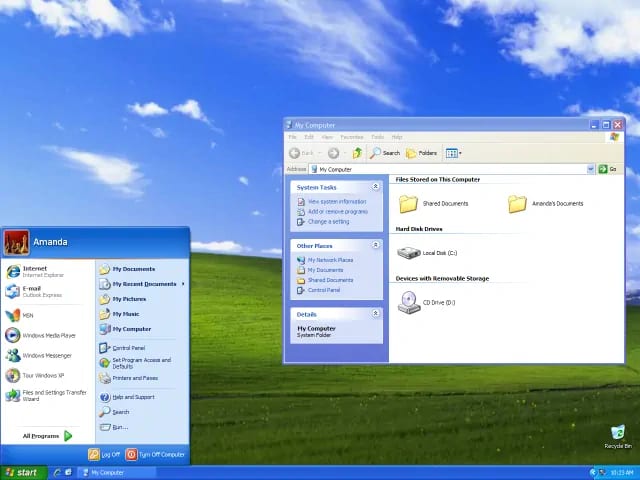
The Luna theme also introduced subtle animations throughout the interface. Windows faded in and out rather than appearing instantly, menus animated smoothly, and even the hourglass cursor was replaced with an animated circle that provided better feedback during processing operations. These refinements made the interface feel more responsive and alive, even when the system was busy with background tasks.
Technical foundation and stability
Windows XP represented the successful merger of Microsoft’s consumer and business operating system lines, bringing the stability and security of the NT kernel to home users for the first time. This unification eliminated the reliability issues that had plagued Windows 95, 98, and ME, providing a robust foundation for both personal and professional computing. The NT kernel’s protected memory architecture meant that when one application crashed, it no longer brought down the entire system. Users could simply terminate the problematic program and continue working, a dramatic improvement over the frequent complete system freezes that characterised earlier Windows versions.
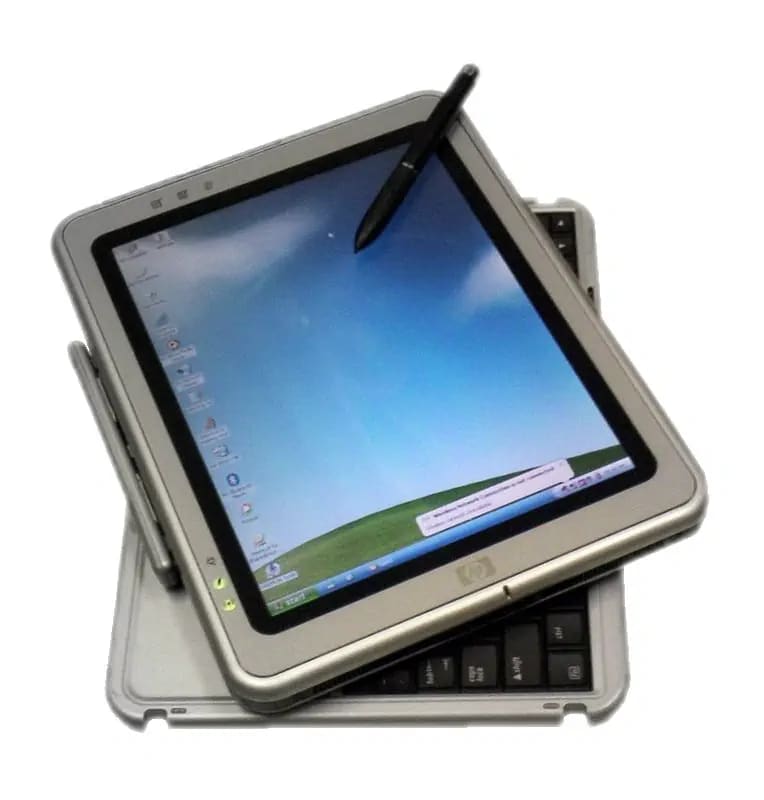
The system’s enhanced security model, whilst still permissive by modern standards, introduced concepts like user account separation and basic firewall functionality. These features laid the groundwork for the more comprehensive security approaches that would characterise later Windows versions. Windows XP also introduced Fast User Switching, allowing multiple users to maintain separate sessions on the same computer without logging each other out. This feature proved particularly valuable in households with multiple family members sharing a single PC.
Windows XP’s longevity speaks to its technical excellence. The operating system remained in widespread use for over a decade, with extended support continuing until April 2014. Even after official support ended, numerous systems continued running XP, particularly in specialised industrial and point-of-sale environments where the stability and familiarity of the system outweighed security concerns. Windows XP became the longest-serving Windows version, with some installations still operating in isolated environments today, nearly a quarter-century after its release.
The security-focused era: Windows Vista and 7
Windows Vista (2006): Aero Glass and security enhancement

Windows Vista, released in November 2006, introduced the Aero Glass interface with its translucent window effects and enhanced visual depth. The Aero theme represented Microsoft’s response to Apple’s increasingly sophisticated interface design, featuring subtle animations, live thumbnails, and three-dimensional window management through features like Flip 3D. The translucent window borders and taskbar created a sense of depth, whilst animations like the window minimisation effect that showed windows flowing down into the taskbar provided visual continuity that helped users track their applications.
More significantly, Vista introduced User Account Control (UAC), a security feature that required administrator approval for system changes. Whilst initially controversial due to frequent permission prompts that interrupted workflow, UAC represented a fundamental shift towards more secure computing practices that would influence all subsequent Windows versions. The security model in Vista addressed the longstanding Windows vulnerability where users typically operated with full administrative privileges, allowing malware to make system-level changes without any barriers. UAC’s prompt-and-elevate approach meant that even administrative users operated with standard privileges by default, only elevating to administrator status when explicitly approving system changes.

Vista also introduced numerous other security enhancements, including Windows Defender for anti-malware protection, BitLocker drive encryption for protecting sensitive data, and improved Windows Firewall with outbound connection filtering. The system featured enhanced parental controls, allowing parents to restrict computer usage times and block inappropriate content. These security improvements, whilst creating friction in the user experience, established principles that remain central to Windows security today.
Despite its innovations, Vista faced significant criticism for performance issues and hardware compatibility problems. The system’s substantial hardware requirements, particularly its recommendation for 1 GB of RAM (double that of Windows XP), meant that many existing computers struggled to run it effectively. Driver compatibility issues plagued the launch, with many peripherals lacking Vista-compatible drivers for months after release. These challenges damaged Vista’s reputation, despite the system’s important technical and security advancements.
Windows 7 (2009): refinement and performance

Windows 7, launched in October 2009, addressed Vista’s performance and compatibility issues whilst retaining its security enhancements and visual improvements. The system featured refined Aero effects, improved taskbar functionality with jump lists and window previews, and enhanced touch support that anticipated the coming mobile computing revolution. The redesigned taskbar eliminated the Quick Launch area in favour of pinning applications directly to the taskbar, creating a unified location for both launching and managing applications. Jump lists provided contextual menus for pinned applications, showing recent documents and common tasks, dramatically improving workflow efficiency.
Windows 7’s success restored confidence in Microsoft’s desktop platform, with many users and businesses adopting it as their long-term operating system choice. The system’s balance of visual appeal, performance, and stability made it one of the most beloved Windows versions in the platform’s history. Performance improvements were immediately noticeable, with faster boot times, more responsive application launching, and better memory management that allowed the system to run smoothly on hardware that struggled with Vista.

The system introduced libraries, a new way of organising files that aggregated content from multiple locations into single virtual folders. Users could create a Documents library that showed files from multiple drives and network locations, simplifying file management without requiring reorganisation of existing folder structures. Windows 7 also improved networking with HomeGroup, which simplified home network setup and file sharing among trusted computers.
Windows 7’s mainstream support continued until January 2015, with extended support lasting until January 2020. The system’s popularity persisted well beyond these dates, with many businesses and users reluctant to upgrade due to satisfaction with Windows 7’s stability and performance. Its eventual replacement by Windows 10 represented one of the most significant operating system transitions in PC history.

The touch revolution: Windows 8 and interface transformation

Metro design and touch-first computing
Windows 8, released in October 2012, represented Microsoft’s most radical interface transformation since Windows 95. The Metro design language (later renamed Modern UI) featured flat, colourful tiles designed primarily for touch interaction, reflecting Microsoft’s attempt to create a unified interface across desktop, tablet, and phone platforms. The full-screen Start screen replaced the traditional Start Menu, displaying live tiles that could show real-time information from applications without opening them. Weather tiles displayed current conditions, mail tiles showed unread message counts, and news tiles cycled through headlines, creating a dynamic, information-rich home screen.
The removal of the traditional Start Menu in favour of a full-screen Start Screen proved highly controversial among desktop users. The interface’s touch-centric design, whilst innovative, created a jarring experience for keyboard and mouse users who had relied on decades of established interface conventions. The dual-personality nature of Windows 8, with both Modern UI apps and traditional desktop applications, confused users and created workflow disruptions as they switched between radically different interface paradigms. Desktop users found themselves repeatedly thrust into the full-screen Start screen environment when they simply wanted to launch a program.

Windows 8 did introduce genuine innovations beyond its controversial interface. The system featured significantly faster boot times through hybrid boot technology, improved task manager with detailed resource usage information, and better multi-monitor support with individual taskbars for each display. The Windows Store provided a centralised location for discovering and installing applications, similar to app stores on mobile platforms. File Explorer gained a ribbon interface, replacing traditional menu bars with context-sensitive command ribbons that revealed relevant tools based on selected file types.
Windows 8.1 (2013): responding to user feedback
Microsoft responded to user criticism with Windows 8.1 in October 2013, reintroducing a Start button (though not the full Start Menu) and providing options to boot directly to the desktop. These changes acknowledged that the touch-first approach needed refinement for traditional PC users whilst maintaining the system’s tablet-friendly capabilities. The update allowed users to display their desktop background on the Start screen, creating better visual continuity between the two environments. Windows 8.1 also improved the search functionality, integrating web results with local file searches, though this feature proved controversial as it sent user queries to Microsoft’s servers by default.
The 8.1 update made Modern UI apps more flexible, allowing them to be snapped side-by-side in various configurations rather than the rigid split-screen arrangement of Windows 8. Users could now run three or even four apps simultaneously in snapped views, making the Modern UI environment more practical for multitasking. The update also restored some familiar elements like the All Apps view that provided a scrollable list of installed programs, partially addressing the discoverability issues that plagued Windows 8’s tile-only approach.

Despite these improvements, Windows 8.1 couldn’t fully overcome the negative reception of Windows 8. Many businesses chose to skip the Windows 8 generation entirely, either maintaining Windows 7 deployments or waiting for the next Windows release. The consumer market similarly showed limited enthusiasm, with many users opting to purchase new computers with Windows 7 downgrade rights rather than embrace Windows 8’s radical redesign.
The unified platform era: Windows 10 and continuous evolution

Return of the Start Menu and universal apps
Windows 10, launched in July 2015, marked Microsoft’s return to a more traditional desktop interface whilst incorporating lessons learned from the Windows 8 experiment. The restored Start Menu combined the familiar program list with Live Tiles, creating a hybrid approach that served both traditional and modern application paradigms. This compromise satisfied desktop users who wanted the classic Start Menu whilst providing space for the dynamic tile interface that worked well on tablets and touch-enabled devices. The Start Menu could be resized, and the tile section could be expanded to fill the screen, effectively recreating the Windows 8 Start screen for those who preferred it.
The Universal Windows Platform (UWP) enabled developers to create applications that could run across desktop, tablet, phone, and Xbox platforms with minimal modification. This unified approach reflected Microsoft’s vision of seamless computing experiences across all device categories. UWP apps featured automatic scaling for different screen sizes and resolutions, cloud-based settings synchronisation, and integration with Windows features like notifications and sharing. The platform represented Microsoft’s attempt to create an ecosystem comparable to iOS and Android, though adoption among developers remained limited compared to these established mobile platforms.
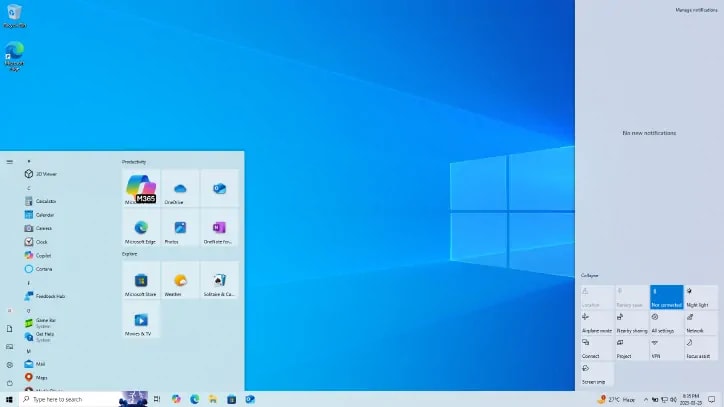
Windows 10 introduced virtual desktops, finally bringing a feature long available in Linux and macOS to Windows. Users could create multiple desktop spaces, organising different applications and workflows in separate environments and switching between them with keyboard shortcuts or through Task View. This feature proved particularly valuable for users who needed to maintain distinct work contexts, such as separating personal and professional tasks or isolating different projects.
Cortana and digital assistant integration
Windows 10 introduced Cortana, Microsoft’s digital assistant, as an integrated system component. Voice commands, search integration, and proactive suggestions represented Microsoft’s first major attempt at AI-powered computing assistance, though Cortana’s impact remained limited compared to competing platforms. Cortana could answer questions, set reminders, search files, control system settings, and even tell jokes, though its capabilities never achieved the widespread adoption seen with mobile assistants like Siri and Google Assistant. The assistant’s deep integration with Windows search meant that users could type or speak queries to find files, applications, settings, and web results from a single interface.
Windows 10’s “Windows as a Service” model represented a fundamental shift in how Microsoft delivered the operating system. Rather than releasing major new versions every few years, Microsoft committed to delivering continuous updates and improvements to Windows 10. This approach included twice-yearly feature updates that added new capabilities and monthly quality updates that addressed security vulnerabilities and bugs. The model aimed to keep all Windows 10 users on recent versions of the operating system, reducing fragmentation and security risks.
The system also introduced Microsoft Edge, a new web browser built from the ground up to replace the aging Internet Explorer. Edge featured better performance, improved security through sandboxing, and modern web standards support. Integration with Cortana enabled voice-activated web searches and intelligent features like reading mode for article-focused browsing.
Windows 10 end-of-support milestone: October 14, 2025
As Windows 10 approaches its end-of-support date on October 14, 2025, Microsoft is encouraging users to transition to Windows 11 to continue receiving security updates and feature improvements. This milestone marks the end of regular security patches and technical support for Windows 10, making systems running the operating system increasingly vulnerable to security threats. The end-of-support deadline represents a significant turning point, as Windows 10 has been running on billions of devices worldwide since its 2015 launch.
Users who continue running Windows 10 after October 14, 2025 will face mounting security risks as newly discovered vulnerabilities will no longer be patched. Microsoft is offering Extended Security Updates for Windows 10 Enterprise and Education editions through October 2028, but these come with additional costs and are primarily targeted at business and educational institutions. For home users, the choice becomes clear: upgrade to Windows 11 or risk operating a system without ongoing protection against evolving cyber threats.
The Windows 10 end-of-support timeline has created renewed interest in Windows 11 adoption, with users evaluating whether their current hardware meets the requirements for the newer operating system. Windows 11’s system requirements, particularly the need for TPM 2.0 (Trusted Platform Module) and specific processor generations, means that some older computers capable of running Windows 10 cannot officially upgrade to Windows 11. This hardware limitation has prompted discussions about electronic waste and the sustainability of requiring hardware upgrades for security updates, though Microsoft maintains that these requirements enable important security enhancements that protect users from modern threats.
The modern era: Windows 11 and AI integration

Design refinement and centred interface
Windows 11, announced in June 2021 and released in October 2021, introduced a centred Start Menu and Taskbar design that reflected contemporary aesthetic trends. The system’s rounded corners, updated icons, and refined typography created a more cohesive visual experience whilst maintaining compatibility with existing Windows applications. The visual overhaul extended throughout the interface, with new system sounds, redesigned context menus, and modernised system dialogues that replaced decades-old Windows elements with contemporary designs.
The design changes extended beyond aesthetics to include functional improvements such as Snap Layouts for enhanced window management and Microsoft Teams integration for improved collaboration. Snap Layouts provided visual previews of different window arrangements, allowing users to quickly organise multiple applications into efficient layouts with a single click. This feature built upon Windows 10’s basic window snapping whilst making it more discoverable and flexible. Windows 11 also introduced Snap Groups, which remembered these window arrangements and could restore them from the taskbar, making it easier to resume complex multitasking sessions.

The system’s widgets panel brought back a concept from Windows Vista, providing quick access to news, weather, calendar, and other information without opening full applications. The widgets display aggregated personalised content, learning from user interests to surface relevant information. Windows 11 also redesigned the Settings app with improved organisation and search capabilities, continuing the transition away from the legacy Control Panel that had existed since Windows 1.0.
Copilot AI: the future of computing assistance
Windows 11’s most significant innovation lies in its integration of Microsoft Copilot, an AI assistant that represents the platform’s evolution towards intelligent computing. Introduced in late 2023, Copilot can assist with document creation, email composition, system troubleshooting, and creative tasks, marking Windows’ transition from a traditional operating system to an AI-enhanced productivity platform. Copilot appears as a sidebar panel that remains accessible while working in any application, providing contextual assistance without disrupting workflow.
The AI integration extends beyond simple voice commands to include contextual understanding, proactive suggestions, and seamless integration with Microsoft 365 applications. Users can ask Copilot to summarise documents, generate presentations, or even create and edit images, transforming the PC into an intelligent creative and productivity tool. Copilot can analyse documents across multiple files, extract key insights, and generate reports that synthesise information from various sources. This capability represents a fundamental shift from computers as tools that execute explicit commands to intelligent assistants that can understand intent and accomplish complex tasks through natural language instructions.
Windows 11’s AI features extend beyond Copilot to include Copilot Plus PCs, systems with dedicated neural processing units that enable advanced AI capabilities directly on the device. These AI-enhanced systems feature capabilities like Windows Studio Effects for improved video conferencing with background blur, eye contact correction, and automatic framing that follows speakers during calls. The local AI processing ensures that these features work without cloud connectivity whilst maintaining user privacy by keeping video processing on the device.
Recall, another AI-powered feature introduced for Copilot Plus PCs, creates a searchable timeline of everything users have done on their computer, allowing them to find information they’ve previously viewed by describing what they remember rather than knowing exact file names or locations. Though initially controversial due to privacy concerns, the feature demonstrates the potential for AI to fundamentally change how users interact with their computing history. The system takes periodic snapshots of screen content, analyses them using on-device AI, and creates a searchable index that users can query with natural language questions like “find that restaurant recommendation from last week” or “show me the budget spreadsheet I was working on Tuesday.”
Windows 11 also introduced AI-powered features in built-in applications. Paint gained Cocreator, which uses AI to generate images based on text descriptions and sketches. Photos received advanced background removal and search capabilities that can identify objects, people, and locations in images. Even Notepad, the simple text editor that has existed since Windows 1.0, gained AI-powered features like content suggestions and improved spell checking through integration with Microsoft’s language models.
The integration of AI throughout Windows 11 represents Microsoft’s vision for the next generation of computing, where users can accomplish complex tasks through conversation rather than navigating menus and dialogues. This transformation mirrors the revolution that Windows 95 brought when it made computing accessible through graphical interfaces. Just as the Start Menu replaced memorising DOS commands, Copilot aims to replace navigating through complex application interfaces with natural language interaction.
Enhanced gaming and DirectStorage technology
Windows 11 brought significant improvements to gaming performance through technologies like DirectStorage, which allows games to load assets directly to the graphics card without burdening the CPU. This technology, adapted from Xbox Series X/S consoles, dramatically reduces loading times in games designed to utilise it, enabling richer game worlds with more detailed textures and environments. DirectStorage represents a fundamental architectural improvement that addresses a longstanding bottleneck in PC gaming, where traditional storage access patterns required CPU intervention for every asset loaded.
The system also introduced Auto HDR, which automatically enhances the colour and lighting of older games that weren’t designed for high dynamic range displays. This feature works with over 1,000 DirectX 11 and DirectX 12 games, bringing modern visual improvements to classic titles without requiring developer updates. Auto HDR analyses game rendering and intelligently expands the colour gamut and brightness range, creating more vibrant and realistic visuals on compatible displays.
Windows 11’s gaming improvements extend to the Xbox app, which provides a centralised hub for PC gaming across multiple storefronts. The app integrates with Xbox Game Pass, giving subscribers access to hundreds of games through a subscription model. Cloud gaming support allows users to stream Xbox games directly through their browser, enabling gaming on devices that wouldn’t normally meet the hardware requirements for demanding titles. These features position Windows 11 as Microsoft’s unified gaming platform, bridging the gap between console and PC gaming experiences.
Visual evolution: the design journey through four decades
Logo evolution and brand identity
The Windows logo has undergone continuous evolution, reflecting both design trends and Microsoft’s changing brand identity. The original 1985 logo featured a simple four-paned window design that literally represented the software’s windowing concept, with perspective lines suggesting depth and dimension. The 1992 introduction of the colourful flag design created one of the most recognisable technology logos, with its dynamic, waving appearance suggesting movement and progress. The flag’s four colours became synonymous with Windows, appearing on software boxes, marketing materials, and computer cases worldwide.
The flag logo’s evolution through the 1990s and 2000s reflected changing design aesthetics, from the vibrant colours of the Windows 95 era to the more sophisticated gradients of Windows XP. The Windows Vista and 7 era brought three-dimensional effects and glossy finishes that aligned with the period’s skeuomorphic design trends, with the flag appearing to be made of translucent glass with light passing through it. These visual treatments created a sense of sophistication and modernity, though they also tied the logo to specific design trends that would eventually feel dated.
Windows 8 marked a dramatic shift towards flat design, with the logo simplified to basic geometric shapes that reflected the Metro design language. This minimalist approach continued through Windows 10 and was further refined in Windows 11, where the logo achieved perfect geometric balance whilst maintaining instant recognisability. The Windows 11 logo features four equal squares arranged in a grid, abandoning the perspective and waving effect of previous versions in favour of a clean, contemporary appearance. This simplified logo works effectively at any size, from tiny taskbar icons to massive outdoor advertisements, demonstrating the principles of modern digital-first design.
The logo evolution mirrors broader trends in technology branding, moving from detailed, descriptive designs towards minimal, adaptable marks that work across diverse contexts. The Windows logo must appear on everything from login screens to retail packaging to digital advertisements, requiring a versatility that simpler designs provide more effectively than complex, detailed marks.
Startup screens: the first impression evolution
Windows startup screens have served as users’ first impression of each new system version, evolving from simple text displays to sophisticated animated sequences. Windows 1.0’s basic text-based startup gave way to increasingly sophisticated splash screens that showcased each version’s visual capabilities. These startup sequences became important branding moments, setting user expectations and creating emotional connections with each Windows release.
The Windows 95 startup screen became iconic with its cloud-filled sky and animated progress bar, creating anticipation and excitement for the computing experience to follow. The clouds suggested limitless possibilities, whilst the progress bar provided reassuring feedback that the system was loading properly. Windows XP’s startup screen featured the Luna theme’s signature colours and smooth animations, with a flowing progress bar that reinforced the system’s refined aesthetic. The screen’s simplicity and elegance made waiting for the system to boot feel less tedious, turning a technical process into a polished experience.
Windows Vista and 7 introduced more cinematic approaches with their glowing orbs and particle effects, reflecting the Aero Glass interface’s visual sophistication. The animated particles suggested advanced technology at work, creating a sense that users were accessing powerful capabilities. These startup sequences took advantage of improved graphics hardware, showcasing visual effects that would have been impossible on earlier systems.
Windows 8’s minimalist approach extended to its startup sequence, featuring simple animations that aligned with the Metro design philosophy. The flat, bold design rejected the glossy, three-dimensional aesthetics of previous versions in favour of clean geometric shapes and solid colours. Windows 10 and 11 continued this streamlined approach whilst incorporating subtle animations that hint at the AI-powered capabilities within. The Windows 11 startup screen features a centred animation that matches the system’s overall design language, creating visual consistency from the moment the computer powers on.
These startup screens serve purposes beyond mere aesthetics. They provide feedback during the boot process, reassure users that the system is functioning properly, and establish the visual language that users will encounter throughout their computing session. The evolution of these screens documents changing expectations about what computers should be: from utilitarian tools that required patience to sophisticated devices that should feel responsive and engaging from the first moment of use.
The software ecosystem: building an application universe
Developer community and platform growth
Windows’ success stems largely from its ability to attract and retain a massive developer community. Today, the Windows ecosystem encompasses over 4 million applications ranging from simple utilities to complex enterprise software. This vast software library represents one of Windows’ most significant competitive advantages, ensuring that users can find applications for virtually any task or industry requirement. From accounting software for small businesses to sophisticated engineering tools for designing aircraft, Windows supports professional applications across every conceivable industry vertical.
Windows ecosystem impact metrics:
| Metric | Value |
|---|---|
| Total Windows PCs Worldwide (Est.) | 1.4 billion |
| Software Ecosystem Apps | 4+ million |
| Enterprise Market Share | 75%+ |
| Gaming Market Share | 96%+ |
| Developer Community Size | 26+ million |
| Annual Windows Revenue (2024) | $22+ billion |
| Years of Market Dominance | 30+ years |
The platform’s developer-friendly approach, including comprehensive APIs, development tools, and documentation, has enabled everything from independent software vendors to major corporations to build successful businesses on the Windows platform. Visual Studio, Microsoft’s integrated development environment, has played a crucial role in this ecosystem development by providing powerful tools for creating Windows applications. Visual Studio’s evolution has matched Windows’ own development, adding support for new programming languages, frameworks, and development paradigms whilst maintaining compatibility with legacy codebases.
The Windows developer ecosystem extends beyond traditional desktop applications to include web applications, progressive web apps, and hybrid solutions that combine local and cloud capabilities. Microsoft’s embrace of open-source technologies, including integrating the Windows Subsystem for Linux (WSL) that allows running Linux applications natively on Windows, has broadened the platform’s appeal to developers who work across multiple operating systems. This openness represents a dramatic shift from Microsoft’s earlier approach of promoting proprietary Windows-specific technologies, reflecting the modern reality of cross-platform development.
Independent developers and small software companies have built substantial businesses on Windows, creating specialised tools that serve niche markets too small for major software publishers to address profitably. This long tail of applications means that Windows users can find software for obscure tasks like genealogy research, amateur radio operation, or restoring vintage photographs, ensuring the platform remains relevant across diverse user communities. The democratisation of software development through accessible tools and distribution channels has enabled students, hobbyists, and entrepreneurs to create applications that reach millions of users worldwide.
Gaming revolution and DirectX innovation
Windows transformed personal computing into a gaming platform through the introduction of DirectX, a set of APIs that enabled high-performance graphics and audio processing. This technology made Windows PCs competitive with dedicated gaming consoles, spawning a multi-billion-dollar PC gaming industry. Before DirectX, game developers had to write code targeting specific graphics cards and sound hardware, making PC game development complex and limiting compatibility. DirectX provided a standardised interface that worked across diverse hardware, allowing developers to create games that would run on any DirectX-compatible system whilst taking advantage of the most powerful graphics capabilities available.
The Windows gaming ecosystem now represents over 96% of the PC gaming market, supporting everything from casual mobile-style games to cutting-edge virtual reality experiences. The integration of gaming features directly into Windows, including Xbox integration and Game Bar functionality, demonstrates gaming’s central role in the modern Windows experience. The Xbox app provides a unified interface for accessing games from multiple storefronts, managing friends lists across gaming services, and recording gameplay footage. Game Bar, accessible via a keyboard shortcut whilst playing any game, provides quick access to performance metrics, screenshot tools, and social features without requiring players to exit their games.
Windows’ gaming dominance extends across multiple gaming genres and business models. Free-to-play online games, premium single-player experiences, indie titles from solo developers, and massive multiplayer worlds all thrive on the Windows platform. Steam, Epic Games Store, GOG, and numerous other digital distribution platforms compete to offer Windows gamers the best selection and prices, creating a vibrant marketplace that benefits consumers. This competitive environment contrasts sharply with the controlled ecosystems of console gaming, where platform holders tightly regulate game distribution and pricing.
The introduction of ray tracing support in DirectX 12 brought cinema-quality lighting to real-time gaming, enabling reflections, shadows, and global illumination that adapt dynamically to player actions. These advanced graphics capabilities, combined with high refresh rate monitor support and technologies like NVIDIA G-SYNC and AMD FreeSync, make Windows PCs the platform of choice for gamers seeking the most advanced visual experiences. Windows also supports virtual reality gaming through platforms like SteamVR and Windows Mixed Reality, enabling immersive experiences that transport players into virtual worlds.
Esports, competitive gaming that has evolved into a billion-dollar industry with professional players, teams, and global tournaments, primarily occurs on Windows PCs. Games like League of Legends, Counter-Strike, Dota 2, and Valorant host competitions with prize pools reaching tens of millions of dollars, all running on Windows systems optimised for competitive performance. The reliability, performance, and widespread availability of Windows make it the natural choice for esports competitions where even milliseconds of latency or momentary performance drops can determine winners and losers.
Windows’ global impact and market dominance
Market share and enterprise adoption
Windows currently maintains dominant market positions across multiple computing segments. Desktop market share stands at approximately 70.31% globally as of October 2025, with particularly strong performance in enterprise environments where Windows holds over 75% market share. This dominance reflects Windows’ successful balance of user familiarity, application compatibility, and administrative capabilities that enterprise IT departments require. Businesses value Windows’ centralised management tools, which allow IT administrators to deploy software, enforce security policies, and troubleshoot issues across thousands of computers from central locations.
Global OS market share 2025:
| Operating System | Desktop Share 2025 | Mobile Share 2025 |
|---|---|---|
| Windows | 70.31 | 0.0 |
| macOS | 13.54 | 26.92 |
| Linux | 4.04 | 0.0 |
| ChromeOS | 1.84 | 0.0 |
| Other | 10.27 | 73.08 |
Windows versions market share 2025:
| Version | Market Share 2025 | Peak Year | Support Status |
|---|---|---|---|
| Windows 11 | 49.05 | 2021 | Current |
| Windows 10 | 40.84 | 2015 | Ending 2025 |
| Windows 7 | 9.15 | 2009 | Ended 2020 |
| Windows 8/8.1 | 0.62 | 2012 | Ended 2023 |
| Windows XP | 0.3 | 2001 | Ended 2014 |
| Other | 0.04 | N/A | Various |
The platform’s longevity contributes to its market position, with some Windows XP installations still in use nearly 25 years after the system’s introduction. This backward compatibility and gradual evolution approach has enabled organisations to protect their software investments whilst gradually adopting newer technologies. Many businesses maintain custom applications developed decades ago, often mission-critical software that would be prohibitively expensive to replace. Windows’ commitment to backward compatibility means these legacy applications continue functioning on modern operating systems, allowing businesses to modernise their hardware and security posture without abandoning functional software.
Government organisations worldwide rely on Windows for everything from administrative tasks to critical infrastructure management. The platform’s mature security features, compliance certifications, and extensive management capabilities make it suitable for environments with strict regulatory requirements. Healthcare organisations use Windows systems to manage electronic health records, insurance claims, and medical imaging systems. Financial institutions process billions of transactions daily on Windows servers and workstations, trusting the platform’s stability and security for operations where downtime or data loss could have catastrophic consequences.
Educational institutions from elementary schools to universities deploy Windows systems extensively, providing students with computing environments that match what they’ll encounter in the workforce. Microsoft’s educational licensing programs make Windows affordable for schools, whilst the platform’s extensive educational software ecosystem supports teaching across all subjects and grade levels. Students learning to use computers on Windows develop skills that transfer directly to workplace environments, creating a virtuous cycle that perpetuates Windows’ dominance.
Economic impact and industry influence
Windows’ economic impact extends far beyond Microsoft’s direct revenue of over 22 billion dollars annually. The platform supports an estimated 26 million developers worldwide and enables countless software companies, system integrators, and IT service providers. This ecosystem effect means that Windows’ influence on the global technology economy far exceeds its direct financial contribution. Computer manufacturers, component suppliers, software publishers, training organisations, and technology consultants all depend on the Windows ecosystem for substantial portions of their revenue.
+ Read more: The $1.2 trillion question: What if Bill Gates never sold his Microsoft shares or donated his fortune?
The platform’s standardisation effect has also influenced hardware development, with PC manufacturers designing systems specifically optimised for Windows requirements. This symbiotic relationship between Windows and the PC hardware industry has driven innovation in processors, graphics cards, storage systems, and peripheral devices. Intel and AMD design processors with instruction sets and features that Windows can exploit for better performance. Graphics card manufacturers like NVIDIA and AMD work closely with Microsoft to ensure their hardware delivers optimal performance with DirectX. Storage device manufacturers create NVMe solid-state drives that take advantage of Windows storage technologies for maximum throughput.
Component manufacturers announce Windows-certified hardware that meets Microsoft’s specifications for reliability and compatibility, giving consumers confidence that their purchases will work properly with the operating system. This certification process creates quality standards that benefit the entire PC industry, reducing support costs and improving customer satisfaction. Peripheral manufacturers design mice, keyboards, monitors, printers, and countless other devices with Windows compatibility as a primary requirement, knowing that Windows support is essential for commercial success.
The impact extends to emerging technologies like artificial intelligence hardware. Companies developing neural processing units and AI accelerators prioritise Windows compatibility, knowing that the platform’s massive user base represents the primary market for consumer AI applications. This creates a feedback loop where Windows’ dominance drives hardware innovation, which in turn enables new Windows features that further strengthen the platform’s competitive position.
Looking forward: the AI-powered future
Windows 2030 vision and intelligent computing
Microsoft’s “Windows 2030 Vision” outlines a future where traditional input methods like keyboards and mice become as antiquated as command-line interfaces seem to today’s users. This transformation envisions AI agents handling routine tasks, natural language interfaces replacing complex menus, and predictive systems that anticipate user needs. Future Windows versions may fundamentally alter how users interact with their computers, making computing more conversational, contextual, and proactive. Users might simply describe what they want to accomplish, and intelligent agents would break down these goals into component tasks, execute them across multiple applications, and present results for approval.
Voice-first interfaces, intelligent task automation, and seamless cross-device experiences could transform the PC from a tool users operate to an intelligent assistant that collaborates with them. Imagine arriving at your computer in the morning and having it brief you on overnight emails that require action, calendar conflicts that need resolution, and documents requiring your review, all prioritised by AI that understands your work patterns and preferences. The system might proactively draft responses to routine emails, schedule meetings by analysing participant availability and preferences, and prepare briefing documents by aggregating information from multiple sources.
This AI-powered future extends beyond productivity tasks to creative work. Artists might describe visual concepts in natural language and watch as AI generates starting points for their projects, refining results through conversational iteration. Writers could collaborate with AI that suggests structural improvements, checks consistency across long documents, and even generates alternative phrasings that better match intended tone. Musicians might hum melodies and have AI suggest complementary harmonies, arrange compositions for different instruments, or generate accompanying visuals for performances.
The transformation also encompasses system maintenance and troubleshooting. Rather than navigating settings menus or searching support forums, users could simply describe problems and watch as AI diagnoses issues, suggests solutions, and implements fixes with user approval. The system might proactively identify potential problems before they impact users, automatically updating drivers, clearing temporary files, and optimising performance without requiring manual intervention.
Privacy and security in this AI-powered future represent critical considerations. Microsoft envisions on-device AI processing that keeps sensitive information local whilst still providing intelligent assistance. Transparent controls would allow users to understand what data AI systems access and how they use it, with granular permissions enabling different trust levels for different types of AI assistance. This balance between capability and privacy will likely define the success of AI-powered operating systems.
Cloud integration and hybrid computing
The future Windows experience will likely blur the boundaries between local and cloud computing. Microsoft’s investments in Azure cloud services and AI infrastructure position Windows to leverage both local processing power and cloud-based intelligence. This hybrid approach could enable more sophisticated AI capabilities whilst maintaining the responsiveness that users expect from their local devices. Computationally intensive tasks like video rendering, complex simulations, or training machine learning models could seamlessly shift to cloud resources when available, returning results to local devices as if processing occurred locally.
Windows 365 and similar cloud PC services demonstrate Microsoft’s vision for computing that transcends individual devices. Future Windows versions may seamlessly synchronise not just files and settings, but entire computing environments across multiple devices and platforms. Users might start working on a desktop computer, continue on a tablet during their commute, and finish on their phone, with applications, open documents, and even running processes following them across devices. The distinction between devices becomes less relevant when the actual computing happens in the cloud, with local hardware simply providing input and display capabilities.
This cloud-centric approach could fundamentally change device purchase decisions. Rather than buying powerful computers that can handle demanding tasks, users might purchase lighter, less expensive devices that connect to cloud-based computing resources for heavy workloads. This model could extend computing capabilities to users in regions where powerful hardware remains unaffordable, democratising access to sophisticated applications and AI capabilities through subscription-based cloud services.
The integration of cloud and local computing also enables new collaboration paradigms. Multiple users might work simultaneously in the same application instance, with changes syncing in real-time across participants. AI could facilitate these collaborations by translating languages on the fly, summarising discussions for participants who join late, and suggesting solutions based on the collective expertise of team members. The boundaries between individual computing and collaborative environments could dissolve, making teamwork as natural as individual work.
Security benefits emerge from this hybrid model as well. Sensitive computations could occur in secure cloud environments with advanced threat detection, whilst results return to local devices only after thorough security scanning. System updates and security patches could deploy instantly across all user devices from cloud-managed policies, eliminating the traditional window of vulnerability between patch release and user installation.
Sustainability and environmental considerations
Future Windows development must address growing concerns about electronic waste and energy consumption. The Windows 10 end-of-support situation, where functional hardware cannot officially run Windows 11 due to strict system requirements, has highlighted tensions between security, performance, and sustainability. Microsoft faces pressure to balance protecting users through modern security features against extending the useful life of existing hardware to reduce environmental impact.
Windows 11’s system requirements, particularly the TPM 2.0 and specific processor generation mandates, have rendered millions of functional computers unable to officially upgrade. This situation has prompted discussions about Microsoft’s responsibility for the resulting electronic waste. Future Windows versions may need to offer tiered security models where older hardware can continue running newer Windows versions with reduced security features, allowing users to make informed decisions about acceptable risk levels rather than being forced into hardware upgrades.
Energy efficiency represents another critical sustainability concern. Windows could incorporate more aggressive power management that reduces energy consumption when systems are idle whilst maintaining instant responsiveness when needed. AI might learn usage patterns and proactively shift intensive background tasks to periods when renewable energy generation peaks, reducing the carbon footprint of computing. Data centres hosting Windows cloud services could coordinate computational workloads globally, routing tasks to locations with abundant renewable energy or cool climates that require less cooling infrastructure.
Microsoft has committed to carbon negativity by 2030, meaning the company aims to remove more carbon from the atmosphere than it emits. This commitment extends to Windows, where software optimisations that reduce energy consumption directly contribute to Microsoft’s sustainability goals. Features that extend battery life in laptops, reduce power draw in desktop systems, and minimise energy usage in data centres all play roles in meeting these ambitious targets.
The circular economy represents another area where Windows could contribute to sustainability. Future versions might include better support for hardware repair, making it easier for users to upgrade components rather than replacing entire systems. Software optimisations could extend the viable lifespan of older hardware, reducing the pressure to constantly upgrade. Microsoft could also develop programmes to refurbish and redeploy computers running older Windows versions to schools, non-profits, and underserved communities, ensuring functional hardware finds continued use rather than ending up in landfills.
Conclusion: four decades of continuous innovation
The History of Windows OS spans a 40-year journey from a simple graphical shell atop MS-DOS to today’s AI-powered platform represents one of technology’s most successful continuous evolution stories. The platform’s ability to adapt to changing user needs, technological capabilities, and market conditions whilst maintaining compatibility with decades of existing software demonstrates remarkable engineering and strategic vision. This balancing act between innovation and stability has allowed Windows to remain relevant through multiple technology eras, from the command-line age through the Internet revolution to today’s AI transformation.
From democratising computing through graphical interfaces to enabling the Internet revolution, supporting the gaming industry’s growth, and now pioneering AI integration in consumer computing, Windows has consistently positioned itself at the forefront of technological change. The platform’s influence extends beyond individual productivity to encompass entire industries, economic ecosystems, and global communications infrastructure. Billions of people have learned to use computers through Windows, developing skills and expectations that shaped the broader technology industry.
As Windows approaches its fifth decade, the integration of artificial intelligence promises to be as transformative as the original introduction of graphical interfaces. The platform that once made computing accessible to millions now aims to make computing intelligent for billions. This evolution continues Windows’ foundational mission: making the power of computing available to everyone, regardless of their technical expertise. Just as Windows 1.0 eliminated the need to memorise DOS commands, future Windows versions aim to eliminate the need to navigate complex application interfaces, allowing users to accomplish their goals through natural conversation with intelligent assistants.
The next chapter in Windows’ history will likely be written in natural language conversations with AI assistants, predicted workflows that anticipate user needs, and computing experiences that adapt to individual preferences and contexts. Just as Windows 1.0 seemed revolutionary in 1985, the AI-powered computing experiences emerging today may seem primitive compared to what Windows will become by 2030. The constant throughout this evolution remains Microsoft’s commitment to making computing more accessible, more powerful, and more integral to human productivity and creativity.
Windows has survived numerous competitive threats, technology transitions, and market disruptions by remaining adaptable whilst providing the stability that users and businesses require. As the computing landscape continues evolving with AI, cloud services, and new device categories, Windows’ ability to integrate these innovations whilst maintaining its core identity will determine whether the platform remains dominant through its next four decades. The October 14, 2025 end-of-support deadline for Windows 10 represents not just the conclusion of one era, but the beginning of another where AI transforms computing as fundamentally as graphical interfaces did forty years ago.
The story of Windows is ultimately the story of personal computing itself, a narrative of increasing accessibility, growing capability, and expanding impact. From office workers to creative professionals, from students to scientists, from gamers to grandparents, Windows has provided the foundation for human accomplishment across countless domains. As we stand at the threshold of the AI age, Windows continues its journey of making the impossible possible, ensuring that computing serves human needs rather than the other way around.


